ProTypestyles

Showing posts with label Title Designer. Show all posts

Tuesday, August 5, 2014

Free S4T Title Template plus Texture: Mystify

click to enlarge

S4T Texture Vapor.png (click to enlarge)
We've been introducing ways to work with the texture mapping feature inside Premiere Pro's Title Designer in recent weeks.

In this template, we furnish two different text objects with slightly different takes on the same texture mapped into the same text but with a few adjustments in strokes and shadows, etc.

By altering the textures alpha scale attribute, you can create semi-transparent effects like what we're doing here...then with a shadow that is a bright color instead of dark, you can create some rather convincing 'glow' kinds of effects right in the Title Designer.

Textures are everywhere...this one was created inside Photoshop with the Render-Clouds effect.  By loading this texture into Photoshop, you can create further changes to it to create different effects.  Explore and try all kinds of weird stuff...often, this is where the discoveries happen.

Download this free template and the included texture here. 

A REMINDER:

As always, our document on placing Premiere Pro Title Templates so you can find them in your template dialog is available here, and our Free and Premium products are available at walterbiscardi.com and CS6 and CC/CC 2014 users can also find our free typestyles, our 2013 free templates, and our Premium Typestyle and Template library on adobeexchange.com.

Wednesday, July 30, 2014

Free S4T Premiere Pro Title Template: Gray Oval


Sometimes you need a simple template to build on...a shape...some text...some strokes and shadows and metallic sheens...

Just add some imagination to customize it to suit your purpose.

This template is a generic logo waiting for your text and your colors for your project.

As always, it was completely created in Premiere Pro's Title Designer and can be loaded and edited there as well.

Download this S4T Title Template here.  If you need information on how to place Premiere Pro Title templates on your system, check out the link in the right margin for a free PDF.

Wednesday, July 23, 2014

Free S4T Premiere Pro Title Template: More Texture Variations


Continuing with the texture theme, we've taken the S4T Texture Metal Grill file and applied it in three different ways in this title to show you the wide variations to can achieve with the way you implement textures in Adobe's Title Designer.

If you haven't already, be sure to download the Metal Grid logo and texture file here.

Then download this Free S4T Title Template for your library and take a look at what you can do with textures.

Thursday, June 12, 2014

Free S4T Premiere Pro Title Template: Movable Type

click to enlarge
Today we utilize a digital tool to create an homage to the original movable type.

Even Gutenberg himself would recognize this image...characters lined up, each on their own base.

You'll notice that each letter is its own object so the gradients could be altered a bit, along with slight nudges in alignment to get that varied feel from letter to letter.

It's an experiment that you can add to your S4T Template library to alter and use as you please in cases where a title aesthetic from the 1400s is exactly what you were looking for...  Download it here.

Monday, June 2, 2014

Free S4T Premiere Pro Title Template: Depth of Field

click to enlarge
This template is really kind of a concept exercise.  Very few users of Premiere Pro's Title Designer set out to create blurry, or 'out of focus' text, but with a little re-purposing of the shadow attribute, it can be done.

Another approach would be to create two titles and just do the blurring on the Premiere Pro sequence of course...but that's another blog entry entirely.

Add this template to your S4T library by downloading it here.

Wednesday, May 28, 2014

S4T 45 Free Typestyles: You choose the font, and we supply the rest

Style4Type 45 Free Typestyles (click to enlarge)
Some of you might look at our 45 Free typestyles and be concerned that you don't see a lot of type face variety.

Next to the original typestyle library that shipped with your software, the actual fonts that are visually represented are few in our 45 Free S4T Typestyles Library set.

The default typestyle library (click to enlarge)
Since versions of Premiere Pro since CS3 are available for Windows and Mac and those two systems have different fonts included with the system, and on top of that, each user can add fonts to their system over time, there isn't a good way to predict which compatible fonts are installed on each user's system.

For this reason, most S4T Typestyles (there are a few exceptions) are built around basic fonts like Arial or Times.  This makes the results for our users as predictable as possible.

4 different fonts using the Superbroadcaster 'style'  (click to enlarge)
Keep in mind that this presents no limitation for you, as the user.  You can simply type some text using an S4T Typestyle and then change the font to something you'd prefer from your system and keep the 'style' attributes.

You could also take an existing type object and simply apply a style without changing the font (use Alt/Opt).  The four type objects shown to the left all use the "Superbroadcaster' typestyle from the Free S4T Typestyle Library.

The Title Designer tool inside Premiere Pro continues to be an undiscovered gem for most users...at least most users who haven't yet discovered Style4Type.com.

Download 45 Free Style4Type Typestyles here...and check out the Premium Styles and Templates available for Premiere Pro while you're there.

Thursday, May 22, 2014

Free S4T Template PROJECT: News GFX

Background image for illustration only (click to enlarge)
We've built another project using the Title Designer to create a series of elements than combine them.

In this case we have a typical news network lower third with a variety of distracting elements all competing for your attention...just like the big guys do.

In this project you'll find separate elements that can each be altered by you with your own custom text and images...even change the color scheme if you'd like...it's all available in the Titler.  This project includes a series of layers: a background with the opaque color elements, a logo, and multiple text elements including a crawl moving across the bottom.  You can replace our text with your own...we just gave you something to start with.

Illustrated layer order (click to enlarge)
The project is saved as CS6, so the project will load in CS6 and later.  If you have an earlier version of Adobe Premiere Pro, each title is also saved separately inside the zip, and you can load them and use them in a variety of older versions.  Follow the layer stacking order we have in the illustration to reconstruct the entire graphic.

Download the project here.

Monday, May 5, 2014

Free S4T Template PROJECT: Energy Pulse

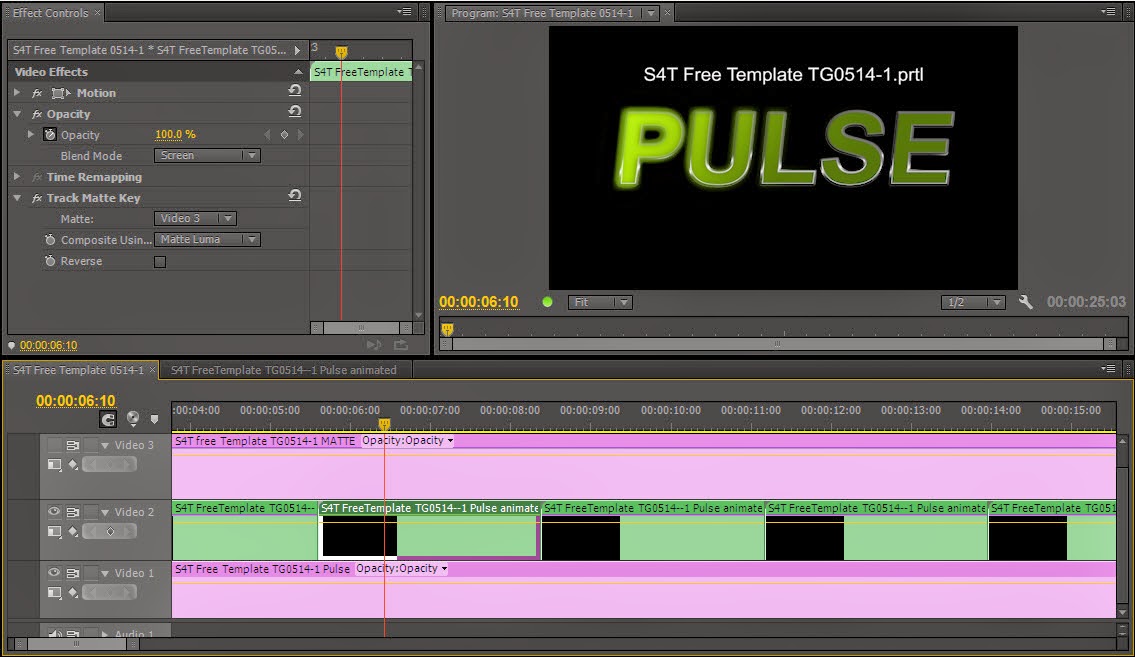
 Today's free template is actually a collection of titler files put together to accomplish an interesting effect using Premiere Pro's built-in effects...and the titler.

There are three separate files involved in this effect:

1. The main title itself,

2. A matte created by simply duplicating the main title file and making the text white and  turning off all strokes, and turning on a black background,

Figure A
3. A title file consisting of a large rectangle drawn inside the titler with a green/black gradient applied,

First, we created a sequence for the rectangle gradient file to animated left-right on top of a black layer (Figure A).  In this case, we stretched the graphic to create a longer "bright" state, but you can adjust this as you prefer.  We created key frames, one at the beginning with the green completely off-screen left, and one at the end with the green off-screen right.  The animated bright element is now complete.

Second, we created another sequence and put the main title element on V1, we nested the pulse sequence we just completed on V2 (we repeated it several times as you can see in Figure B, but wait a bit before you create the duplicates if you're building this from scratch), and we placed the matte title on V3 and clicked on the "eye"-con to make V3 invisible.

Two last bits of business...we added a gaussian blur to the matte to make the edges of it soft and imply that sort of 'glow' you see in the finished effect.  We then added the Track Matte effect to the nested 'Pulse' sequence on V2 and set it to matte from V3 and composite using Luma.  We also enabled the screen key function in the opacity blend mode on the nested sequence.

Once the effect looks right, you can duplicate the nested sequence to create as many loops as you want.

This download is a zip file that contains the Premiere Pro project with all the settings for you to reverse-engineer yourself, as well as the individual title files.  If you have CS6 or later, you can use the project file.  If you have an earlier version, you can build the same effect by and loading the individual title files and following these instructions.

(*If you are using a version of Premiere Pro that pre-dates the ability to nest sequences, you would have to render the moving green element as a separate video clip and import it and use that in place of the nested sequence.)

Download the project and the files here.


Monday, April 28, 2014

Free S4T Premiere Pro Title Template: Radial Gradient Experiment

click to enlarge
Adobe Premiere Pro's Title Designer has so many tools that it can be easy to overlook some that are less frequently used.

Gradients are available on type/shape face and inner/outer strokes and can be used in ways that aren't immediately obvious.  Today's template is an exercise in visualization.  The type and the shape have the same attributes for comparison purposes.  By altering the attributes already on the text, you can create some new looks that might utilize the gradient feature in ways you hadn't thought of before.

Pay special attention to the gradient 'repeat' property when you download today's S4T free template here.

Tuesday, April 22, 2014

Free S4T Premiere Pro Title Template: Easy Buttons

click to enlarge
Sometimes simplicity is strangely illusive.

Text in video projects can often be most effective when the design is less complex.
Simple text and simple shapes can often convert conjunctions and articles within titles that can seem awkward when you are struggling to determine whether to use smaller type sizes or italics or some other treatment to separate those words from the more significant words within your text.

Check out the example images for some usage ideas.

Download this S4T Free Title Template here.

example 1

example 2

example 3

Monday, April 14, 2014

Post NAB Lower 3rd Week #1

click to enlarge
I had plans to post templates during NAB, but just didn't get enough time.

To make up for it, this week is officially the 2014 Post-NAB Lower 3rd Week.  We'll put up a Lower 3rd each weekday this week.

Download this rounded gray and tangerine number here.

Monday, March 31, 2014

Free S4T Premiere Pro Title Template: 2 Degree Tilt List

Here's a list of important (and unimportant) points.

Customize the list by replacing the placeholder text with your own points, and alter the background elements to suit your own color scheme.

...level type is so yesterday, download your list of tilted bullet points here.

Tuesday, March 25, 2014

Free S4T Premiere Pro Title Template: Seasonal Savings!

For those of us doing local or regional TV commercials, we just can't have enough ready-to-go graphics lying around.

In honor of the seasonal change in both the northern AND southern hemispheres of the planet, we have a title template with both a spring and fall theme.  (Replace the US Dollar symbol with your currency of choice.)

These price tags come with their own string to be conveniently "attached" to nearly anything, and as always, the template was completely created in Premiere Pro's title tool, so it can be revised and customized without leaving the application.

Download this free S4T template here.

Wednesday, March 12, 2014

Free S4T Premiere Pro L3rd Title Template: Aerodynamic

click to enlarge
There may be times when a straight edge doesn't fit with the design aesthetic of your project.

This Lower 3rd offers a bit of metallic background behind the name text...almost suggestive of the cross section of an aircraft wing.  Job titles or locations, etc can be added below on the semi-transparent background.

As always, the title can be adjusted in any way inside the Adobe Title Designer because the title was created entirely inside the titler without leaving Premiere Pro.

Download this free Style4Type Lower 3rd here.

Thursday, March 6, 2014

Free S4T Premiere Pro Title Template: Broken

Occasionally even damaged stuff needs a title card.

Sometimes it's a concept...a plan...a rule...it's busted, and you need to convey its shattered and fragmented wreckage to the viewer right off the top.

This title template has a metallic theme and a slight imperfection that you can see if you look closely enough...

A few small pieces of debris below can be duplicated if more are necessary, and since it's all created in the Adobe Title Designer, you can change everything and customize it for your project.

Download this slightly imperfect title template here.

Friday, February 28, 2014

Free S4T Title Template SET: Wedding Title Slide and L3rd

click to enlarge
It's been a busy week and we haven't had the time we normally would to get title templates posted for you, so our Friday post features a matching set of Premiere Pro Title Templates...a Wedding Title Slide and matching L3rd.

A gold tone background and a crimson ribbon are featured in the set with a design based on medium length names for the default text.

As always, every element in the title was created in the Adobe Title Designer inside Adobe Premiere Pro, so every element can be customized there as well...you never have to leave your edit software.

With our more complex templates, there are layers that need to be ordered properly to maintain the appearance of the title, and you'll notice that the part of the ribbon that "wraps around" is a separate element from the foreground ribbon, and needs to be the "back" layer to appear behind the gold element.

click to enlarge
The text inside the ribbon is on a path to follow the curve, and is "pushed" to the right using spaces inserted to the left, so you can type in longer strings of text with minimal adjustment to the curve.

Download these title templates by clicking here for the title slide, and here for the lower 3rd.


Monday, February 24, 2014

S4T Tip: Using your Titles in other software

One thing that frustrates many Adobe users is that the text generators in Photoshop and After Effects, while useful, aren't as feature-rich as Adobe Premiere Pro's Title Designer.

The challenge with using the Title Designer as a text source for other software is that the proprietary text file is kept inside the Premiere Pro project, and when exported as a Title, the resulting .prtl file isn't readable by any other software program (Adobe or otherwise) outside of Premiere Pro.

However, the text (if not the Title file) can be used in other programs by utilizing a fairly simple export procedure.

Disclaimer: There are a wide variety of versions of Premiere Pro in use.  This process is verified in CS6 and CC.  In many earlier versions of Premiere Pro, a still image needs to be exported through the exporter dialog and settings chosen in the export dialog will affect the file settings.
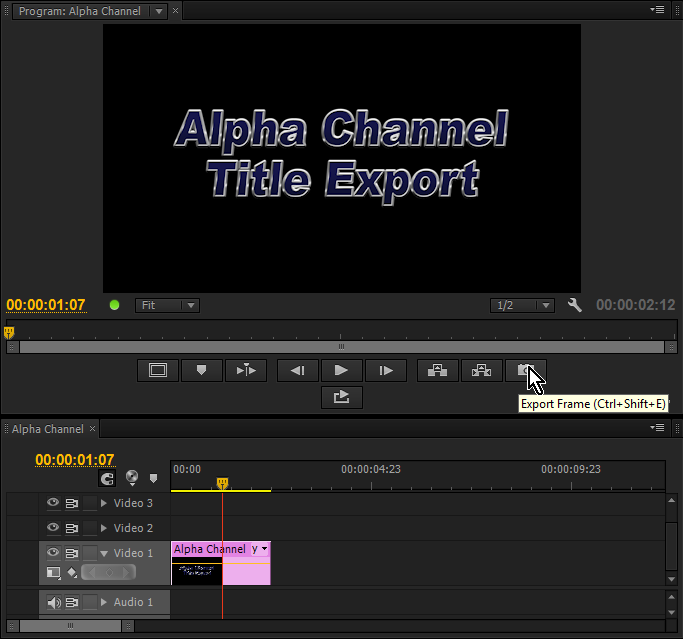

Fig. A  Premiere Pro Title Export  (click to enlarge)

1.  When you make a title with alpha channel transparency that you want to preserve, you must first place it into an edit sequence.


(Keep in mind that the frame dimensions of the sequence will be the frame dimensions of the file you export.  Creating the Title at the largest dimensions possible and placing it on a sequence of the same dimensions will preserve the most options for you later.)
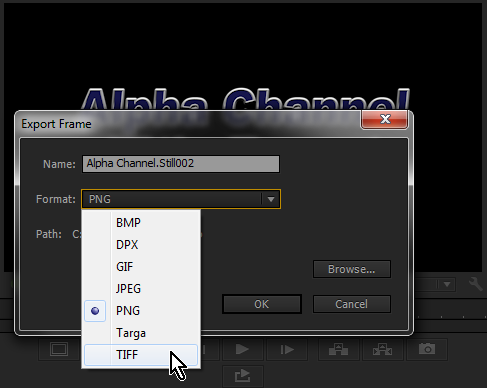

Fig. B  Premiere Pro's Export Frame dialog  (click to enlarge)
2.  After positioning the playhead in the sequence over the Title (as shown in Fig. A), you can use the "Export Frame" icon/button to bring up the Export Frame dialog (as shown in Fig. B).

*If you don't see the Export Frame icon or the transport controls, you can use the Settings icon (the wrench symbol), to access the menu where you can choose to "Show Transport Controls".


3. The Export Frame dialog has several options for export formats, some that can carry an alpha channel, and some (like JPEG) that do not.
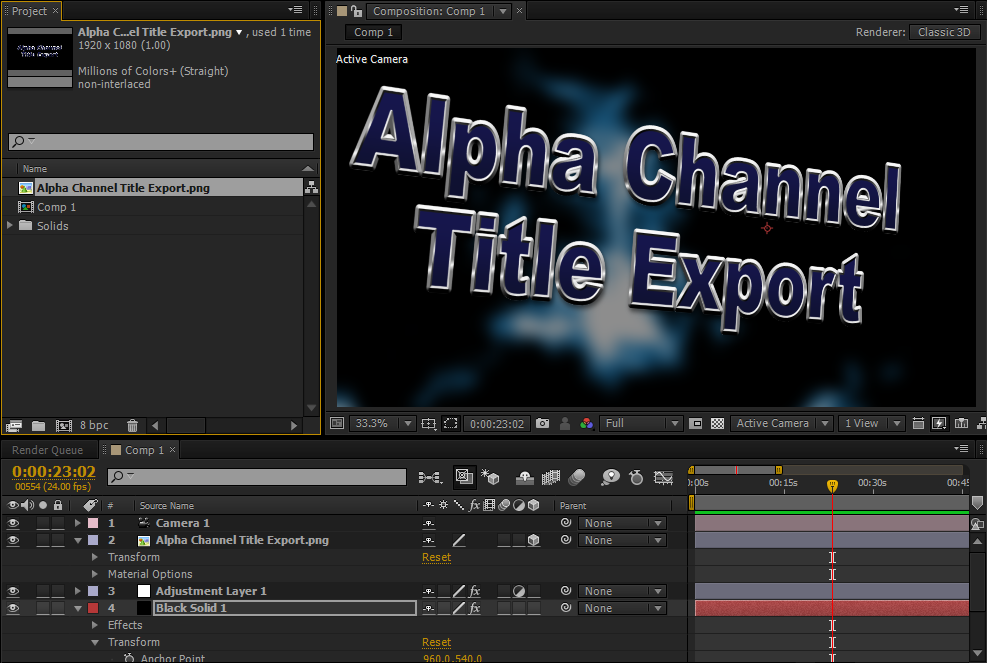
Fig C.  Exported Premiere Pro Title in After Effects  (click to enlarge)
The two alpha-capable file types that will maintain the widest compatibility with the widest variety of outside applications would be PNG and TIF.  (However every individual's workflow is different and it's possible your optimal choice may be different.)


4.  Loading the file into Photoshop will immediately show you the alpha transparency in the PNG and the TIF alpha channel will come in as a layer, though it won't immediately open showing classic Photoshop transparency.

Loading either file into After Effects (as shown in Fig. C) enables you to use the title as a composited element using the alpha channel transparency.

Obviously in this scenario, the text in the exported title document is not editable as the text generated in Photoshop or After Effects, so keeping the Premiere Pro project in case you need to return to the Title document and make a change will make your life easier as client revisions start to come in, and exporting the revised title to the same location and file name as the previous version will act as an "auto-replace" for an AE project that is pointed to the previous file's location.

Friday, February 21, 2014

Free S4T Premiere Pro Title Template: Hard Edge Corporate

click to enlarge
For those of us who are working with corporate projects, we always have a need to find new ways to pile text on a screen.

Here is a chrome and black design that will ensure that your viewers will never be bored.

...well, of course you need to replace the example text with something interesting.  THEN your viewers will not be bored...

...of course, then there is the matter of a music bed that doesn't put anyone to sleep...  Well, we can't solve all your challenges for you, but we can supply you with this snazzy (yes, "snazzy") Title Template that you can alter and customize in any way necessary without leaving Premiere Pro's Title Designer.  Download this Free Title Template to add to your collection here.

Thursday, February 20, 2014

Free S4T Premiere Pro Title Template: Custodians of BADGE

click to enlarge
So...many of us are familiar with a certain television series...about a top-secret confederation of beings with amazing powers and incredible technology.

The organization happens to have a rather coincidental acronym of course...

We were inspired to work through a similar (but non-copyright violating) theme.

We had no "agents" per se in our organization, so our example text has an equally important, and sometime heroic job title.

Our organization also has an acronym, because "Bureau of Admirable, Daring Graphics Experts" is tedious to spell out every time.

This title template has a LOT of objects layered together.  Keep in mind that some objects may have to be dragged off to the side to get to text and graphic elements underneath.

Download the template here.

Tuesday, February 18, 2014

Free S4T Premiere Pro Title Template: Speed Limit Signs

We've been a little obsessed with signs of late...and here are a few more.

The signs in this template are based on signs you may find in the USA, and a sign that would not look out of place in the United Kingdom.

Feel free to re-purpose the subject matter of these signs to suit your project as you won't have to leave Premiere Pro to do it.

Download this free title template and alter any aspect of them inside the Adobe Title Designer inside Premiere Pro.