ProTypestyles

Showing posts with label style4type. Show all posts

Tuesday, August 5, 2014

Free S4T Title Template plus Texture: Mystify

click to enlarge

S4T Texture Vapor.png (click to enlarge)
We've been introducing ways to work with the texture mapping feature inside Premiere Pro's Title Designer in recent weeks.

In this template, we furnish two different text objects with slightly different takes on the same texture mapped into the same text but with a few adjustments in strokes and shadows, etc.

By altering the textures alpha scale attribute, you can create semi-transparent effects like what we're doing here...then with a shadow that is a bright color instead of dark, you can create some rather convincing 'glow' kinds of effects right in the Title Designer.

Textures are everywhere...this one was created inside Photoshop with the Render-Clouds effect.  By loading this texture into Photoshop, you can create further changes to it to create different effects.  Explore and try all kinds of weird stuff...often, this is where the discoveries happen.

Download this free template and the included texture here. 

A REMINDER:

As always, our document on placing Premiere Pro Title Templates so you can find them in your template dialog is available here, and our Free and Premium products are available at walterbiscardi.com and CS6 and CC/CC 2014 users can also find our free typestyles, our 2013 free templates, and our Premium Typestyle and Template library on adobeexchange.com.

Wednesday, July 30, 2014

Free S4T Premiere Pro Title Template: Gray Oval


Sometimes you need a simple template to build on...a shape...some text...some strokes and shadows and metallic sheens...

Just add some imagination to customize it to suit your purpose.

This template is a generic logo waiting for your text and your colors for your project.

As always, it was completely created in Premiere Pro's Title Designer and can be loaded and edited there as well.

Download this S4T Title Template here.  If you need information on how to place Premiere Pro Title templates on your system, check out the link in the right margin for a free PDF.

Wednesday, July 23, 2014

Free S4T Premiere Pro Title Template: More Texture Variations


Continuing with the texture theme, we've taken the S4T Texture Metal Grill file and applied it in three different ways in this title to show you the wide variations to can achieve with the way you implement textures in Adobe's Title Designer.

If you haven't already, be sure to download the Metal Grid logo and texture file here.

Then download this Free S4T Title Template for your library and take a look at what you can do with textures.

Wednesday, July 16, 2014

Free S4T Premiere Pro Title Template plus Texture: Metal Grill

click to enlarge

Here's another title template along with a texture for you.  

We've used the same texture on the foreground text and the background shape with some different settings to show the variation that can be achieved with one texture.

Monday, June 30, 2014

Free S4T Premiere Pro Title Template: Through the Porthole


Template over white (click to enlarge)

Combining your titles with some additional picture or graphic content can add significant visual interest to your video project.

S4T has a Title Template that will get you started doing just that.

Template over video (click to enlarge)
We're showing you the template over white, over video, and over a graphic to give you some ideas on how you might use this template.
Template over a graphic (click to enlarge)

By using a transparent, solid black background in the title, the background image color becomes the base of your palette, with a clear view f the image in the "porthole" frame.

Feel free to modify any of the properties in the template with the Title designer, inside of Premiere Pro.

Download this Free S4T Title Template here.

Wednesday, June 25, 2014

S4T Tip: Saving Custom Premiere Pro Title Templates (It's only weird the first time...)

 If you are a person having a difficult time figuring out how to save your own custom title template in Premiere Pro's Title Designer, you aren't alone.

To call the process 'unintuitive' is probably charitable, but once you understand the language and the odd interface design, it's actually extremely simple...there are, quite literally, 3 steps.
Figure 1 (click to enlarge)


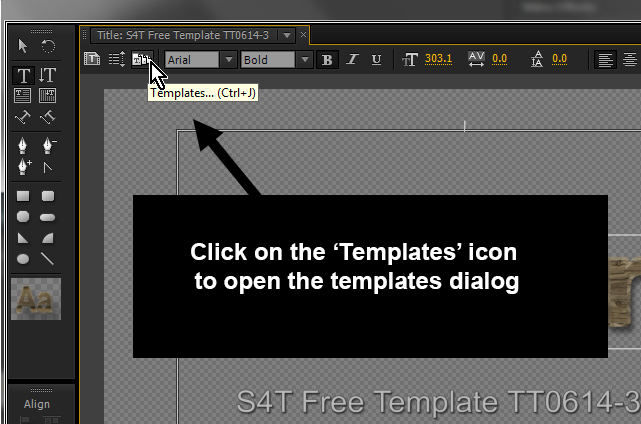
Step 1 is illustrated on figure 1...find the 'Templates' icon and click on it.


Step 2 is laid out in figure 2.  You need to go to the top/right of the templates dialog and click on the unlabeled button, which opens the panel menu.


Figure 2 (click to enlarge)
Step 3 is to forget everything you know about the terminology used in every other part of Premiere Pro, because you won't see a 'save' option of any kind in that menu.  To store the title you're currently working on as a template that you can recall later, choose 'Import Current Title as Template'.  Yes, I know that importing something already in the project seems odd...even 'Export Current Title as Template' would make more sense if 'Save Template' is somehow unworkable..but there you have it.

For information on how to save S4T Free Templates to your library or where the templates are located on your system, download our docs on the topic here.

Tuesday, June 17, 2014

Free S4T Premiere Pro Title Template plus Texture: Old Plank

click to enlarge
 At Style4Type, we've been showing off a lot of features inside the Premiere Pro Title Designer that many users just don't discover on their own.

One of the least knwon features of the Premiere Pro Title Tool is the 'Texture' mapping capabilities for text Fill and Stroke properties.

S4T Texture_Old_Plank 1.jpg  (click to enlarge)
For this week, we've created a Title with a texture mapped into the Fill and Stroke faces.  The texture (S4T Texture_Old_Plank_1.jpg) is included with the .prtl file in a zip file, as you'll need the texture to use this title (most likely with some text of your own of course) in your own productions.

Texture parameters for Fill (click to enlarge)


We've included a screen grab of the Texture parameters under the Fill Properties in the Title Designer interface.  You'll probably notice that the parameters available to customize how textures are mapped on text are extensive.   By playing around with them, you can create new looks which all use a common texture file.  If you have a file of your own you'd like to use as a texture map, just click on the box to the right of "Texture" in the interface to open the load dialog.

We'll do more with Textures in the near future, but you can start to work with Texture mapping your own titles today by downloading the free S4T Premiere Pro Title Template here.

Thursday, June 12, 2014

Free S4T Premiere Pro Title Template: Movable Type

click to enlarge
Today we utilize a digital tool to create an homage to the original movable type.

Even Gutenberg himself would recognize this image...characters lined up, each on their own base.

You'll notice that each letter is its own object so the gradients could be altered a bit, along with slight nudges in alignment to get that varied feel from letter to letter.

It's an experiment that you can add to your S4T Template library to alter and use as you please in cases where a title aesthetic from the 1400s is exactly what you were looking for...  Download it here.

Wednesday, June 11, 2014

Inspiration: AMC's Halt and Catch Fire from Art of the Title

click to enlarge
Art of the Title: "Was there anything that took you by surprise when working on this sequence?."

Patrick Clair: "That anyone would ever allow me to put this mix of red and magenta on the air! I should have been stopped."

Art of the Title covers the creation of the title sequence for AMC's Halt and Catch Fire with the creative team responsible for creating what may be the most red ever crammed into one title sequence.


Monday, June 2, 2014

Free S4T Premiere Pro Title Template: Depth of Field

click to enlarge
This template is really kind of a concept exercise.  Very few users of Premiere Pro's Title Designer set out to create blurry, or 'out of focus' text, but with a little re-purposing of the shadow attribute, it can be done.

Another approach would be to create two titles and just do the blurring on the Premiere Pro sequence of course...but that's another blog entry entirely.

Add this template to your S4T library by downloading it here.

Wednesday, May 28, 2014

S4T 45 Free Typestyles: You choose the font, and we supply the rest

Style4Type 45 Free Typestyles (click to enlarge)
Some of you might look at our 45 Free typestyles and be concerned that you don't see a lot of type face variety.

Next to the original typestyle library that shipped with your software, the actual fonts that are visually represented are few in our 45 Free S4T Typestyles Library set.

The default typestyle library (click to enlarge)
Since versions of Premiere Pro since CS3 are available for Windows and Mac and those two systems have different fonts included with the system, and on top of that, each user can add fonts to their system over time, there isn't a good way to predict which compatible fonts are installed on each user's system.

For this reason, most S4T Typestyles (there are a few exceptions) are built around basic fonts like Arial or Times.  This makes the results for our users as predictable as possible.

4 different fonts using the Superbroadcaster 'style'  (click to enlarge)
Keep in mind that this presents no limitation for you, as the user.  You can simply type some text using an S4T Typestyle and then change the font to something you'd prefer from your system and keep the 'style' attributes.

You could also take an existing type object and simply apply a style without changing the font (use Alt/Opt).  The four type objects shown to the left all use the "Superbroadcaster' typestyle from the Free S4T Typestyle Library.

The Title Designer tool inside Premiere Pro continues to be an undiscovered gem for most users...at least most users who haven't yet discovered Style4Type.com.

Download 45 Free Style4Type Typestyles here...and check out the Premium Styles and Templates available for Premiere Pro while you're there.

Tuesday, May 27, 2014

Free S4T Premiere Pro Title Template: License Plate

click to enlarge
We released a USA automobile license tag back in February (check it out here), but that one seemed a little too colorful to be a car license for some...so we've added another license plate template to the collection.

If you live in California, you'll recognize the color scheme as an homage to that state's license plate from 1969 through 1981 (the blue background changed shade a bit in 1980).

As with all S4T templates, this one is created completely inside Premiere Pro's Title tool and is ready for your customization.  The font is Arial for good cross-platform consistency, but you can probably find a font on your system that may resemble license plate lettering more to you.

Download the License Plate template here.


Thursday, May 22, 2014

Free S4T Template PROJECT: News GFX

Background image for illustration only (click to enlarge)
We've built another project using the Title Designer to create a series of elements than combine them.

In this case we have a typical news network lower third with a variety of distracting elements all competing for your attention...just like the big guys do.

In this project you'll find separate elements that can each be altered by you with your own custom text and images...even change the color scheme if you'd like...it's all available in the Titler.  This project includes a series of layers: a background with the opaque color elements, a logo, and multiple text elements including a crawl moving across the bottom.  You can replace our text with your own...we just gave you something to start with.

Illustrated layer order (click to enlarge)
The project is saved as CS6, so the project will load in CS6 and later.  If you have an earlier version of Adobe Premiere Pro, each title is also saved separately inside the zip, and you can load them and use them in a variety of older versions.  Follow the layer stacking order we have in the illustration to reconstruct the entire graphic.

Download the project here.

Monday, May 5, 2014

Free S4T Template PROJECT: Energy Pulse

 Today's free template is actually a collection of titler files put together to accomplish an interesting effect using Premiere Pro's built-in effects...and the titler.

There are three separate files involved in this effect:

1. The main title itself,

2. A matte created by simply duplicating the main title file and making the text white and  turning off all strokes, and turning on a black background,

Figure A
3. A title file consisting of a large rectangle drawn inside the titler with a green/black gradient applied,

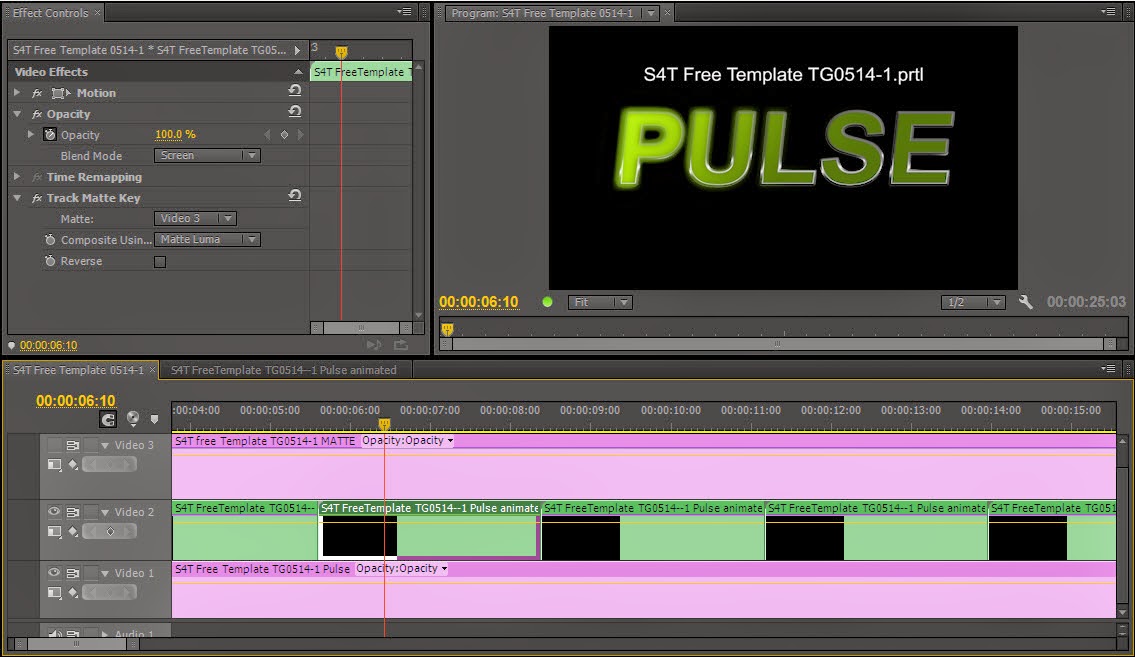
First, we created a sequence for the rectangle gradient file to animated left-right on top of a black layer (Figure A).  In this case, we stretched the graphic to create a longer "bright" state, but you can adjust this as you prefer.  We created key frames, one at the beginning with the green completely off-screen left, and one at the end with the green off-screen right.  The animated bright element is now complete.

Second, we created another sequence and put the main title element on V1, we nested the pulse sequence we just completed on V2 (we repeated it several times as you can see in Figure B, but wait a bit before you create the duplicates if you're building this from scratch), and we placed the matte title on V3 and clicked on the "eye"-con to make V3 invisible.

Two last bits of business...we added a gaussian blur to the matte to make the edges of it soft and imply that sort of 'glow' you see in the finished effect.  We then added the Track Matte effect to the nested 'Pulse' sequence on V2 and set it to matte from V3 and composite using Luma.  We also enabled the screen key function in the opacity blend mode on the nested sequence.

Once the effect looks right, you can duplicate the nested sequence to create as many loops as you want.

This download is a zip file that contains the Premiere Pro project with all the settings for you to reverse-engineer yourself, as well as the individual title files.  If you have CS6 or later, you can use the project file.  If you have an earlier version, you can build the same effect by and loading the individual title files and following these instructions.

(*If you are using a version of Premiere Pro that pre-dates the ability to nest sequences, you would have to render the moving green element as a separate video clip and import it and use that in place of the nested sequence.)

Download the project and the files here.


Monday, April 28, 2014

Free S4T Premiere Pro Title Template: Radial Gradient Experiment

click to enlarge
Adobe Premiere Pro's Title Designer has so many tools that it can be easy to overlook some that are less frequently used.

Gradients are available on type/shape face and inner/outer strokes and can be used in ways that aren't immediately obvious.  Today's template is an exercise in visualization.  The type and the shape have the same attributes for comparison purposes.  By altering the attributes already on the text, you can create some new looks that might utilize the gradient feature in ways you hadn't thought of before.

Pay special attention to the gradient 'repeat' property when you download today's S4T free template here.

Tuesday, April 22, 2014

Free S4T Premiere Pro Title Template: Easy Buttons

click to enlarge
Sometimes simplicity is strangely illusive.

Text in video projects can often be most effective when the design is less complex.
Simple text and simple shapes can often convert conjunctions and articles within titles that can seem awkward when you are struggling to determine whether to use smaller type sizes or italics or some other treatment to separate those words from the more significant words within your text.

Check out the example images for some usage ideas.

Download this S4T Free Title Template here.

example 1

example 2

example 3

Sunday, April 20, 2014

Inspiration: MacGruber from Art of the Title

Satire...humor...explosions...and a Saturday Night Live pedigree.  The film 'MacGruber' has it all.
click to enlarge

The Art of the Title has the low down on how a movie that is, according to one Universal studio staffer,  "...so much better than it should be" came to be...as well as its title sequence.

Check out the full story at the Art of the Title.

Friday, April 18, 2014

Post NAB Lower 3rd Week #5

click to enlarge
The TGIF installment of the Post NAB Lower 3rd Week.

Splitting this title into two titles and having the two components slide in from each side gives you a different look from your everyday lower 3rd.

Download this Premiere Pro Lower 3rd Template here.

Happy Post NAB Lower 3rd Week!

Thursday, April 17, 2014

Post NAB Lower 3rd Week #4

click to enlarge
Continuing with Lower 3rd Week, we have this blue theme graphic.

Curved edges and blue color palette make this lower 3rd...well...different from other lower 3rds...we're fairly certain.

Add this to you collection of lower 3rd templates by downloading it here.

Wednesday, April 16, 2014

Post NAB Lower 3rd Week #3

click to enlarge
For our 3rd installment in Lower 3rd Week, we've gone vegetarian.

With a wood-like typestyle and a green leafy background, you'll have the perfect identifier for your next zoo video...or safari project.

...or perhaps just your next spot for a theme restaurant.

Download L3rd #3 here.